
Turn a Non-Agentic App into an Agentic App: The Steps
Published
From the course: Agentic AI from Scratch (Python), session 5: How to Get Reliable JSON From an LLM: a Fixed Reply Format, json.loads and Function Calling in Python
A plain help-desk app can store tickets, show knowledge articles, and route requests. The moment you ask it to draft an answer, consult internal documents, or take an action, the design becomes more demanding. A fluent response is not enough: the app must use the right context, expose its sources, call only approved tools, and let a person stop risky actions.
The safest way to build that capability is in layers. Start with a working help desk, add one model call, ground answers with retrieval-augmented generation, introduce tools through a controlled agent loop, and finish with a chat interface that asks for human approval when it matters. At every step, check the new boundary before adding the next one.
A plain help desk gives you a trustworthy baseline
Begin with an ordinary application. A user submits a question, the app stores it as a ticket, and a support person reads and answers it. Keep authentication, permissions, ticket history, and document access in normal application code.
This baseline matters because later AI features should improve a known workflow, not replace an undefined one. Before adding a model, you should be able to trace a ticket from submission to resolution and explain who may see or change it.

Caption: The starting workflow records a user question and a human reply.
Alt text: A user sends a question through the help-desk app to a ticket queue, where a support person records a reply.
What you add: A small but complete help-desk flow with users, tickets, status changes, knowledge documents, and an audit trail. Use realistic test documents, but do not put secrets or personal data into development fixtures.
What to check: Verify authorization separately from the user interface. A hidden button is not a permission boundary. Confirm that the server rejects attempts to read or update tickets and documents outside the current user’s access.
Also decide what a successful answer means. For example, it may need to address the question, rely on approved documentation, identify its sources, and avoid changing ticket state without confirmation.
What can go wrong: If the original workflow is unclear, later failures become hard to classify. A missing reply might come from the model, the ticket API, a permission check, or the interface. Weak access controls also become more dangerous once an automated component can make repeated requests.
One LLM call adds drafting, not agency
Next, add a large language model, or LLM, to draft a reply. Send it a clear instruction and the ticket text, then display the result as a draft. The model proposes language; the application still owns identity, permissions, storage, and final submission.
Keep the first integration deliberately narrow. Do not give the model tools or ask it to search your document collection yet. The goal is to learn how model calls behave inside your application boundary. The mechanics are covered in session 04 and session 05.
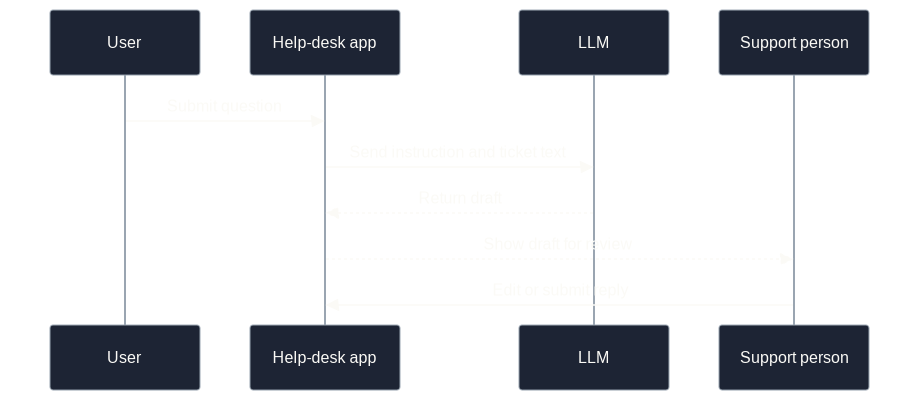
Caption: The LLM drafts text while the application and support person retain control.
Alt text: The help-desk app sends the ticket to an LLM, receives a draft, and shows it to a support person for review.
What you add: A server-side model client, a prompt with a specific task, timeout and error handling, and a place to store or display the draft. Treat model output as untrusted input before rendering or storing it.
Keep the model request small enough to inspect. Record operational metadata that helps diagnose a failure, but avoid logging sensitive ticket text unless your data-handling rules allow it.
What to check: Test direct questions, vague requests, hostile instructions inside ticket text, and model-call failures. Confirm that the draft is visibly different from a submitted reply. Check that a failed call leaves the ticket intact and gives the user a recoverable path.
Evaluate meaning, not just grammar. A polished answer can still be unsupported, incomplete, or contrary to your support policy.
What can go wrong: The model may invent a policy, follow instructions embedded in the user’s message, or answer confidently without enough information. Retries can create duplicate drafts if the surrounding operation is not designed carefully. Sending entire tickets without filtering can also disclose data the model does not need for the drafting task.
Retrieval grounds the answer in documents and exposes sources
The draft can now sound useful, but it does not yet know which internal documents should govern the answer. Add retrieval-augmented generation, usually shortened to RAG. The app searches an approved document collection for passages relevant to the question and gives those passages to the model as context.
The answer should carry source references that map back to the retrieved documents. A reference is useful only if the user can open it and verify that the cited passage supports the answer. Session 15 and session 16 develop this retrieval-and-answering flow.

Caption: Retrieval supplies relevant document passages before the model writes an answer.
Alt text: The ticket question searches approved documents, and the retrieved passages join the question in an LLM request that produces an answer with source references.
What you add: A document-ingestion path, text splitting, a searchable index, metadata for access control and source identity, and a retrieval step before generation. Store stable source information such as the document identifier and passage location alongside indexed text.
In the prompt, distinguish trusted application instructions from retrieved material. Retrieved text is evidence, not authority to change the model’s task.
What to check: Test retrieval on questions whose answers you know are present, absent, or spread across documents. Inspect the retrieved passages before inspecting the generated answer. If retrieval misses the evidence, prompt changes alone will not repair the pipeline.
Verify every displayed source reference. It should point to a document the current user may access, and the referenced passage should support the nearby claim. When the retrieved context is insufficient or conflicting, the app should say so rather than fill the gap.
What can go wrong: Poor text splitting can separate a rule from its conditions. Similar wording can retrieve the wrong policy. Stale documents can produce an outdated answer, while missing metadata can expose a document across permission boundaries.
The model may also cite a retrieved passage that does not support its claim. Passing documents into a prompt does not make the resulting answer grounded automatically; source alignment must be checked.
Tools and an agent loop turn answers into controlled actions
RAG lets the app answer from documents. Tools let it do work. A tool is a narrowly defined operation exposed to the model, such as reading a ticket, adding an internal note, changing a ticket status, or preparing a reply.
The agent loop coordinates those operations. The model receives the current state, chooses either to respond or request a tool, the application validates and runs the request, and the result returns to the model. The loop ends when the model produces a final response or the application reaches a configured stopping condition. Session 20 introduces tools, while session 21 covers the loop that connects tool requests and results.

Caption: The agent loop validates each requested tool call before returning its result to the model.
Alt text: An LLM either returns a final answer or requests a tool; the application validates the request, records the result, and continues the loop.
What you add: Explicit tool schemas, server-side validation, authorization checks, bounded loop execution, structured tool results, and an audit record. Give each tool the smallest useful capability. Separate read-only tools from tools that create external effects.
The application—not the model—must determine the authenticated user and enforce permissions. A model-generated user identifier or ticket identifier is only a requested argument, never proof of authority.
What to check: Test each tool without the model first. Then test the loop with valid requests, malformed arguments, unauthorized resources, tool failures, repeated calls, and requests that never reach a final answer.
Check that write operations are safe to retry or protected against accidental duplication. Confirm that the audit trail can reconstruct which model request led to which tool call and result without exposing data unnecessarily.
What can go wrong: A broad tool can turn a small model mistake into a large application change. Tool descriptions may be ambiguous, validation may accept unexpected input, or the loop may continue making calls without useful progress.
Retrieved documents and ticket text may also contain instructions that try to trigger tools. Treat all external content as untrusted data. It may inform an answer, but it must not override tool policy or authorization.
A chat UI and human approval make agency visible
The final layer is a chat interface that shows the conversation, sources, tool activity, errors, and pending decisions. A chat box alone is not enough. Users need to understand what the app has answered, what it plans to do, and what has already happened.
Use human approval before consequential or difficult-to-reverse actions. The agent proposes the exact tool call, the interface presents its effect and arguments, and the server executes it only after an authorized person approves. Session 37 covers the chat interface, and session 26 focuses on the human-approval boundary.
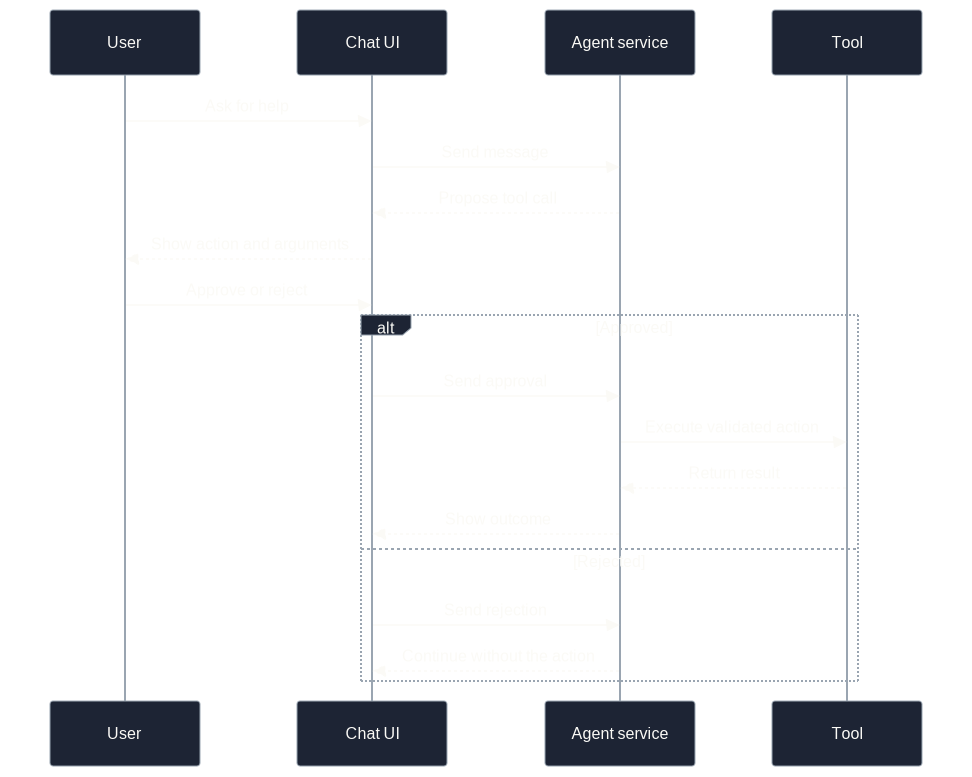
Caption: A proposed tool call pauses until an authorized user approves or rejects it.
Alt text: The agent proposes an action in chat, the user reviews its arguments, and only an approved action reaches the tool.
What you add: Conversation state, clear source links, visible tool status, approval and rejection controls, and a server-side record tying approval to the exact proposed action. Show enough detail for a person to make an informed decision.
Approval should be specific. If the tool name, target, or arguments change after approval, request approval again. Revalidate authorization immediately before execution because permissions or ticket state may have changed while the proposal was waiting.
What to check: Test keyboard navigation, loading states, duplicate clicks, reconnects, expired proposals, concurrent ticket updates, and approval by the wrong user. Make pending, completed, failed, and rejected actions visually distinct.
Check the whole path, not only the interface. A crafted network request must not bypass approval, and refreshing the page must not execute a pending action.
What can go wrong: A vague confirmation such as “continue?” encourages approval without understanding. The interface may show one action while the server executes modified arguments. Duplicate submissions can run an action twice, and stale approvals can apply to a ticket that has already changed.
Too many approval prompts are also a design failure: users may approve mechanically. Keep read-only work separate from consequential changes, and place approval where human judgment genuinely changes the outcome.
Where people get stuck learning this alone
Turning an existing app agentic is where self-study usually stalls. Each step adds a new moving part: model calls and keys, a document index that returns the wrong passages, then tool calls and a loop that can repeat or never stop. The failures are hard to see from the final answer alone, so you need traces at every step, and without a reviewer it is easy to give the agent more authority than the app can safely handle. Do one step at a time, keep a human approval in front of any action you cannot undo, and ask someone to read your tool definitions before you trust them.
If you want a guided order and a reviewer for your work, the Agentic AI Engineering outline lists every session.
Key takeaways
- Begin with a help-desk workflow whose permissions, state changes, and success conditions are already clear.
- Use the first LLM integration for drafting only, and treat every output as untrusted.
- Add retrieval before expecting document-grounded answers, and make every source reference verifiable.
- Expose narrow tools through a validated, bounded, and auditable agent loop.
- Put human approval in front of consequential actions, tied to the exact action that will run.
- Test the boundaries between layers: retrieval and generation, model and tool, proposal and execution, interface and server.
This sequence establishes a practical architecture for turning one help-desk workflow into an agentic application. It does not settle which model, retrieval method, storage system, or approval policy best fits every deployment; those choices depend on the documents, risks, permissions, and operating environment of the application.