
AI Agent vs Chatbot: What Is the Difference?
Published
From the course: Agentic AI from Scratch (Python), session 1: What Is an AI Agent, and How Does It Differ From a Chatbot? A Beginner's Guide to Building One in Python
You ask a support window how to change an account setting. It explains the steps, and you perform them. Now imagine giving a system a different request: check the account, identify the problem, apply the permitted fix, and report what changed. The first system helps through conversation. The second carries work forward on your behalf.
That is the practical difference between a chatbot and an AI agent. A chatbot is primarily designed to exchange messages and produce responses. An AI agent is designed to pursue a goal through a sequence of decisions and actions. The categories can overlap, so the useful question is not whether a product has a chat box. It is how much of the work the system can plan, perform, check, and continue without waiting for another instruction.
The difference appears after the first response
A chatbot receives a message and returns an answer. That answer might be an explanation, a summary, a draft, or a request for more information. The conversation advances when the user sends the next message.
An AI agent can treat the request as a goal rather than as a single prompt. It can decide what needs to happen next, use permitted tools, inspect the result, and choose another action. It stops when the goal is complete, a stopping rule is reached, or human input is required.
Consider a request to prepare a meeting brief. A chatbot might draft the brief from information pasted into the conversation. An agent might be allowed to find the relevant documents, extract open decisions, assemble the brief, notice that one source is missing, and ask for access before continuing.
Think of it as the difference between a guide and a delegate. A guide tells you which road to take. A delegate can travel part of the road for you, within the authority you have given it.

This distinction is about system behaviour, not intelligence. A fluent chatbot may produce an excellent answer without taking any action. A modest agent may perform a narrow task reliably because its goal, tools, and stopping conditions are well defined.
A chatbot keeps the user in the control loop
In a chatbot interaction, the user usually directs the sequence. Each message supplies a new instruction, correction, or piece of context. The chatbot responds to the current conversation, but the user remains responsible for deciding and initiating the next step.
Suppose you are investigating a failed data import. You might ask a chatbot to explain an error message, then paste the relevant configuration, then ask for a corrected version. The chatbot supports each decision, while you gather the evidence and apply the change.
This pattern is useful when judgment should remain with the person. It also works well for tasks whose output is the answer itself: explaining a concept, comparing approaches, rewriting text, or exploring an idea.
A chatbot can still have advanced capabilities. It may remember conversational context, search approved information, or call a tool to answer a question. Tool use alone does not make it an agent. If the system calls one tool only to produce the requested reply and then waits, the interaction still follows a response-oriented pattern.
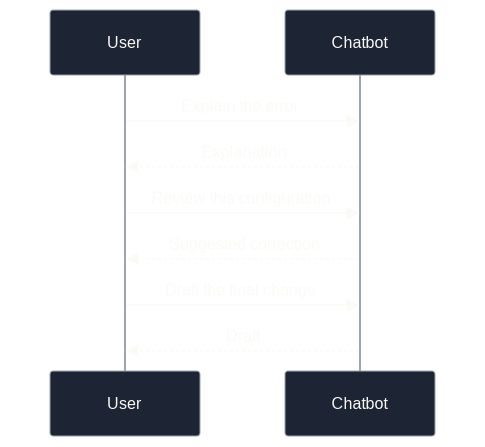
The human attention required by this pattern is not necessarily a weakness. For sensitive, ambiguous, or unfamiliar work, frequent checkpoints can be exactly what makes the system appropriate.
An agent adds a control loop around the model
An AI agent is not merely a language model with a longer prompt. It is a system that places a model inside a control loop: observe the current state, choose an action, perform it through an available tool, inspect what happened, and decide whether to continue.
A tool is any capability the system can invoke, such as reading a file, querying a database, running a test, or updating a record. The agent should receive only the tools and permissions required for its task.
State is the information the agent uses to track progress. It may include the original goal, completed steps, tool results, pending questions, and stopping conditions. Without useful state, the agent can lose track of what it has already attempted.
For example, an agent asked to diagnose a failing software build might inspect the error, locate the related test, compare the implementation with the expected behaviour, make an allowed change, and rerun the test. If the test still fails, the result becomes new evidence for the next decision.

The loop gives an agent more operational independence, but not unlimited independence. A well-bounded agent has a defined goal, restricted tools, clear approval points, and explicit conditions for stopping. “Keep trying until something works” is not a safe or useful task definition.
Autonomy is a range, not an on-off switch
Real systems do not fall into two perfectly separate boxes. A chatbot can perform an action during a conversation, and an agent can use chat as its interface. The visible interface therefore tells you little about the system’s operating model.
A useful comparison has several dimensions:
| Dimension | Chatbot-oriented system | Agent-oriented system |
|---|---|---|
| Primary unit of work | A message and response | A goal and its progress |
| Next step | Usually chosen by the user | May be chosen by the system |
| Tool use | Often supports the current answer | Can advance the task |
| State | Mainly conversation context | Conversation plus task progress |
| Stopping point | After responding | When done, blocked, or required to pause |
| Human role | Directs the sequence | Sets boundaries and handles exceptions |
The boundary also changes according to permissions. One system may suggest an email, another may draft it in a designated location, and another may be permitted to send it after approval. These are different levels of delegated authority even if all three systems use similar underlying models.
Think of autonomy as a dial. Turning it up can reduce the number of hand-offs, but it also increases the importance of controls. The right setting depends on the task, the possible harm from a mistake, and how easily an action can be reviewed or reversed.
| Level | System behaviour | Human involvement |
|---|---|---|
| Answer | Produces information or content | Performs the work |
| Suggest | Recommends a next action | Chooses and performs it |
| Act with approval | Prepares or proposes an action | Approves before execution |
| Act within limits | Chooses and performs permitted actions | Reviews outcomes and exceptions |
This range is more informative than a product label. When someone calls a system an agent, ask what it can actually do, which decisions it makes, and where it must stop.
Agents need stronger boundaries because actions have consequences
A mistaken chatbot answer can mislead a user. A mistaken agent action can also change something outside the conversation. The risk depends on the tool and permission involved: reading a document is different from editing it, and preparing a transaction is different from completing one.
That makes scope important. An agent should know which records, files, systems, or time periods are within its task. Broad goals such as “clean up everything” leave too much room for interpretation.
Approval points provide another boundary. An agent might work independently while gathering information but pause before sending a message, changing access, publishing content, or making an irreversible update. The checkpoint should occur before the consequential action, not after it.
Agents also need observable results. A tool reporting success is useful, but the system may still need to verify the resulting state. For example, after updating a configuration, an agent can read it back or run the relevant check. Verification closes the gap between attempting an action and confirming its effect.

For example, an agent sorting incoming requests might classify them and prepare suggested responses, while a person approves any response involving a policy exception. The boundary follows the consequence of the action rather than the convenience of automating it.
Choose based on the work, not the label
Choose a chatbot-oriented design when the user should control each step, when the main output is information or content, or when the task changes direction through conversation. Research assistance, explanation, brainstorming, and drafting often fit this pattern.
Choose an agent-oriented design when the work has a clear goal, involves multiple connected steps, and can be performed through well-defined tools. The system also needs a reliable way to check progress and recognise completion.
Some tasks benefit from a hybrid. A chatbot can help the user define the goal and constraints, then hand the bounded task to an agent. The agent can return to the conversation when it needs approval, missing information, or a judgment it should not make alone.
For example, a conversational interface might help you specify which files are in scope and what counts as a valid result. An agent can then process those files, record what it changed, and return a summary for review. Conversation handles ambiguity; the agent loop handles repeatable execution.
The simplest adequate design is usually easier to understand and govern. If one response solves the problem, an agent loop adds little. If the user must manually carry every output into the next step, a chatbot may leave too much of the workflow unfinished.
Where people get stuck learning this alone
The difference is easy to say and hard to feel until you have built both. Reading about tools and loops without running them leaves the two ideas blurred, and a first attempt often produces a chatbot with extra prompts instead of an agent. The usual stumbling points are the same as for any agent: getting the environment working, finding out why the model called the wrong tool or never stopped, and having nobody read your code to say which parts are really a loop and which are a single call. Building the smallest version of each side by side, and keeping a trace, is the quickest way to see the line.
If you want a guided order and a reviewer for your work, the Agentic AI Engineering outline lists every session.
Key takeaways
- A chatbot is organised around messages and responses; an AI agent is organised around goals and progress.
- Tool use is not the dividing line. The important question is whether the system can choose and perform subsequent steps.
- Agents use a control loop that observes, decides, acts, and checks.
- Autonomy exists on a range shaped by permissions, approvals, scope, and stopping rules.
- Chat is an interface, not a system category: an agent can converse, and a chatbot can call tools.
- Choose a chatbot when the user should direct the sequence. Choose an agent when a bounded, multi-step task can be delegated safely.
This distinction explains how the two system patterns behave, but it does not determine whether a particular implementation is accurate, secure, or suitable for a specific organisation. Those questions depend on the model, tools, data, controls, and consequences involved.