
How to Get Started with AI Agents
Published
From the course: Agentic AI from Scratch (Python), session 1: What Is an AI Agent, and How Does It Differ From a Chatbot? A Beginner's Guide to Building One in Python
You have a task that feels almost automatable. It may involve reading a request, checking a system, choosing an action and producing a result. A conventional script struggles because the inputs vary, but handing every case to a person is slow.
An AI agent can help when the task requires bounded judgment between clear steps. The safest way to begin is not to build a digital employee that can do anything. Start with one narrow workflow, give the agent only the tools it needs, make every important action observable and expand its authority only after evaluation shows where it is reliable.
A workflow needs judgment before it needs an agent
An AI agent is a software system that uses an AI model to choose actions toward a goal. Those actions may include searching approved information, calling a software tool, updating working state or asking a person for help.
The ability to choose is what separates an agent from a fixed automation. A fixed workflow follows branches written in advance: if this happens, do that. An agent can select the next step when the exact path was not known beforehand.
That flexibility has a cost. The same freedom that helps an agent handle varied inputs also creates more possible failures. It may choose the wrong tool, misunderstand the request or stop before the work is complete.
Use ordinary code when the rules can be stated precisely. Use an agent when the goal is clear but reaching it requires limited interpretation.
For example, renaming every file according to an exact pattern is a scripting task. Reviewing files, identifying which ones appear to contain a contract and placing uncertain cases in a review queue may benefit from an agent.

This distinction prevents a common mistake: adding an AI model to work that does not need judgment. An agent should earn its complexity by handling variation that would otherwise require many brittle branches or repeated human interpretation.
A narrow outcome creates a workable first agent
“Handle customer operations” is not a useful first goal. It includes many tasks, systems and meanings of success. “Read a support request, classify its topic and draft a reply for review” is narrow enough to design and test.
A practical agent goal names four things:
- The input it receives
- The result it should produce
- The tools it may use
- The conditions that require human review
The boundary matters as much as the goal. If the agent drafts text, say whether it may send that text. If it retrieves records, say whether it may change them. If it encounters missing information, define whether it should ask a question, return an incomplete result or escalate.
Think of the first agent as a new colleague working from a tightly scoped desk. The desk contains the relevant documents and a small set of tools. It does not contain a master key to every system.
Consider an agent that prepares a meeting brief. Its input is a meeting title and an approved set of internal notes. Its output is a structured summary containing the purpose, known decisions and unresolved questions. It can search those notes, but it cannot send messages or change the source material.
| Boundary | Meeting-brief example |
|---|---|
| Input | Meeting title and approved notes |
| Output | Purpose, decisions and unresolved questions |
| Permitted tool | Search the approved notes |
| Human review | Required when sources conflict or context is missing |
A boundary this specific makes evaluation possible. You can inspect whether the brief reflects the available material, whether uncertainty is visible and whether the agent stays inside its permitted role.
Tools turn model output into controlled action
A model can propose a next step, but software must define what steps are actually available. A tool is a controlled function the agent can call, such as retrieving a document, looking up a record or creating a draft.
Each tool should do one clear job. Its name and description should state when it is appropriate. Its inputs should be structured and validated rather than accepted as unrestricted text whenever possible.
Keep the initial tool set small. If several tools overlap, the agent has to distinguish between choices that even a person may find ambiguous. Clear tools reduce that ambiguity.
Permissions belong in the application around the model. A prompt saying “do not modify records” is guidance, not an access control. If the agent should have read-only access, its credentials and tool functions should only permit reading.
For example, an agent that checks an order question might receive two tools: one retrieves an order by its identifier, and one creates a reply draft. It does not need a general database tool. It also does not need a tool that sends the reply if a person must approve the result.

Tool results also need boundaries. Return only the information the task requires. Treat text retrieved from documents or external systems as data, not as new instructions that can redefine the agent’s role.
The agent loop should have visible stopping rules
Most agents operate as a loop. The agent examines the goal and current state, chooses an action, receives the result and decides what to do next. The loop ends when the goal is complete, review is required or a limit is reached.
State is the information carried between those steps. It may contain the original request, tool results, decisions already made and remaining work. Keep it explicit enough that a developer or reviewer can reconstruct what happened.
Every loop needs stopping rules. Without them, an agent can repeat an unproductive action, keep searching for unnecessary information or consume resources without improving the answer.
Useful limits include:
- A maximum number of steps
- A list of actions that always require approval
- A rule for repeated or failed tool calls
- A completion check tied to the requested output
- A route for missing, conflicting or uncertain information
Suppose a document-review agent must identify a renewal date. It searches the permitted document, records the relevant passage and returns the date. If it finds two conflicting dates, it stops and requests review instead of guessing which one governs.
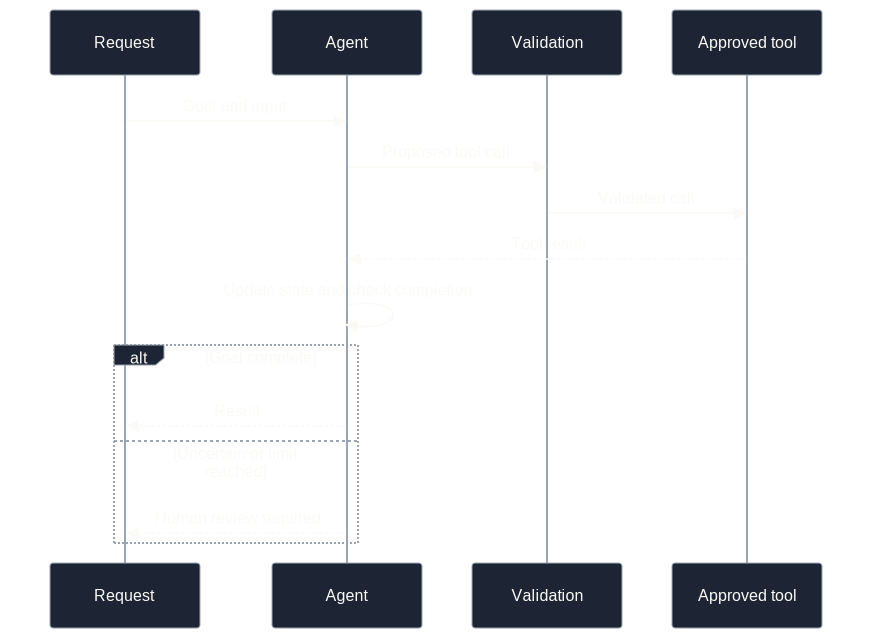
A stopping rule is not merely a technical safeguard. It defines what the system considers sufficient evidence and where human judgment remains necessary.
Evaluation starts with realistic cases and explicit checks
A successful demonstration proves that one example worked. It does not establish how the agent behaves across routine, unusual and incomplete requests.
Build an evaluation set from representative task shapes. Include straightforward cases, missing inputs, conflicting information, irrelevant material, unavailable tools and requests outside the agent’s authority. Remove sensitive information from test material.
Then define what a good result means for each case. Some checks can be exact: the agent called only permitted tools, produced the required fields and did not exceed its step limit. Other checks require structured human review, such as whether a summary preserves the important meaning of its source.
Evaluate the path as well as the final answer. A polished answer can conceal an unsupported assumption. A correct result reached through a forbidden tool call is still a failure.
For example, a scheduling agent may produce the right date while ignoring a stated timezone. The visible answer might look plausible, but the reasoning path reveals that the success was accidental. The evaluation should therefore check both the proposed time and the source information used to derive it.
| Evaluation area | Question |
|---|---|
| Result | Did the agent produce the required output? |
| Action path | Were its steps relevant and supported? |
| Boundaries | Did it use only permitted tools and data? |
| Escalation | Did it stop when information or authority was insufficient? |
Record failures by type rather than treating them as isolated bad answers. A recurring wrong tool choice suggests unclear tool definitions. Unsupported conclusions suggest missing evidence checks. Excessive steps suggest weak completion criteria.
Limited authority makes early deployment safer
An agent that drafts a change is easier to recover from than one that applies it. Begin with the least consequential form of participation that still tests the workflow.
A useful progression is observation, recommendation, approval and then carefully bounded action. In observation mode, the agent processes real inputs but does not affect the workflow. In recommendation mode, it prepares an output for comparison or review. Approval mode lets a person accept or reject a proposed action. Autonomous action comes only where the consequence and recovery path are understood.
Not every workflow should reach the final stage. High-impact, ambiguous or difficult-to-reverse decisions may always need a person.
Logging should capture the request, relevant state, model output, tool calls, tool results, approvals and final status without exposing unnecessary sensitive data. This creates the evidence needed to diagnose failures and improve the system.
For example, an invoice agent might first identify possible mismatches without changing anything. Later, it could prepare a correction for approval. Allowing it to apply a correction would be a separate decision based on observed failure modes, permissions and recovery options.

Expansion should be granular. One reliable action does not justify broad access to adjacent systems. Grant each new permission as its own change with its own evaluation and rollback plan.
Where people get stuck learning this alone
Most people who start on their own stall in the same few places. The first is setup: Python environments, API keys and library versions can take a whole evening before a single agent runs. The second is debugging the agent loop, where the model picks a wrong tool or never stops and the printed answer does not show why. The third is that nobody reviews your code, so a design that works on your three test cases can go unnoticed until it fails on a fourth. None of this is a reason to wait; it is a reason to keep a trace of every step and to get a second pair of eyes on your first agent.
If you want a guided order and a reviewer for your work, the Agentic AI Engineering outline lists every session.
Key takeaways
- Use an agent when a narrow workflow requires judgment that fixed rules cannot express cleanly.
- Define the input, output, tools and escalation conditions before choosing implementation details.
- Enforce permissions in software rather than relying on instructions alone.
- Give the agent a small set of clear tools and explicit stopping rules.
- Evaluate realistic cases, including the action path and boundary compliance.
- Increase authority in stages, keeping human approval where consequences are high or recovery is difficult.
This approach settles how to design and test a first bounded agent. It does not determine whether a particular workflow will be accurate, affordable or safe at scale; those answers depend on the task, the available evidence, the systems involved and the consequences of failure.