
How to Get Started with AI Coding
Published
From the course: GenAI and Agents Fast Track, session 7: Coding with an AI agent: the first session
You ask an AI coding tool to add a small feature. It responds with a confident block of code, but the code uses the wrong file, assumes a dependency you do not have, and quietly changes behavior you meant to preserve. The difficult part of AI coding is not generating more code. It is giving the tool enough context, limiting the size of each change, and checking the result with the same care you would apply to code written by a person.
AI coding works best as a short feedback loop: describe one clear outcome, let the tool inspect the relevant context, review its proposal, run objective checks, and correct what remains. That loop is worth learning because it turns AI from an unpredictable code generator into a useful development partner whose work stays under your control.
Start with a task you can verify
Your first AI-assisted task should be small enough that you can explain the desired result and recognize whether it works. Good starting points include adding a validation rule, writing tests for an existing function, improving an error message, or explaining an unfamiliar module.
Avoid beginning with a request such as “build the whole application.” A broad request leaves many choices unstated: architecture, data storage, error handling, security boundaries, naming, and user experience. The tool must then guess, and several individually reasonable guesses can combine into the wrong system.
Choose a task with a visible finish line. “Reject an empty display name and show the existing validation message” is more useful than “improve the profile form.” The first request identifies an input, an expected behavior, and a constraint.
Think of it as asking for directions. “Take me somewhere interesting” invites interpretation. “Take me to the entrance shown on this map without using toll roads” gives the guide a destination, context, and a boundary.

Caption: A small task creates a clear path from intent to verification.
Alt: A flow from a small task through expected behavior and review to a testable result.
Before asking for code, write down three things:
- What should change?
- What must remain unchanged?
- How will you know the task is complete?
If you cannot answer the third question, the task is not ready for automation. You may still use AI to explore the problem, but ask for an explanation or a plan before asking it to edit code.
Context determines whether the answer fits your codebase
An AI coding tool cannot reliably account for information it has not been given or allowed to inspect. A request may sound complete while omitting the language version, project structure, local conventions, existing tests, or the function that already handles a similar case.
Give the tool the narrowest useful context. That usually includes the relevant files, the current behavior, the desired behavior, and any constraints that affect the implementation. If the repository has written development instructions, include or point to them as well.
For example, instead of saying, “Add request validation,” you could say:
Add validation to the existing account update handler. Reject a blank display name using the project’s current error format. Do not change the response shape or add a dependency. First inspect the handler and its tests, then propose the smallest change.
This prompt does not prescribe every line. It establishes the destination and tells the tool where to look before choosing a route.
Context should be relevant, not merely large. Providing an entire repository when only two modules matter can bury the important constraints. Begin with the files closest to the behavior, then expand the scope if the tool identifies a dependency or missing definition.

Caption: Useful context combines intent, relevant code, and constraints before implementation begins.
Alt: Desired behavior, relevant code, constraints, and tests feed a proposal that either requests more context or proceeds to implementation.
Do not paste secrets, private keys, access tokens, or production customer data into a prompt. Replace sensitive values with clear placeholders. If a task requires access to protected systems, keep authentication outside the conversation and provide only the non-sensitive information needed to reason about the code.
Ask for a plan before accepting a change
For anything beyond a tiny edit, ask the tool to explain its intended change first. A short plan exposes misunderstandings while they are still cheap to correct.
A useful plan should identify the files likely to change, the behavior being added or preserved, and the checks that will demonstrate completion. If the plan proposes unrelated refactoring, a new dependency, or changes outside the requested area, narrow it before implementation.
For example:
Inspect the relevant code and give me a three-step implementation plan. State your assumptions and list the tests you would add. Do not edit files yet.
This separates reasoning from modification. You can correct an assumption such as “this endpoint returns a page” before it becomes a collection of code changes built around that mistake.
In our view, the smallest coherent change is the best default for early AI coding work. Smaller patches are easier to read, easier to test, and easier to reverse when an assumption proves wrong. “Small” does not mean incomplete; it means every changed line contributes to the stated outcome.
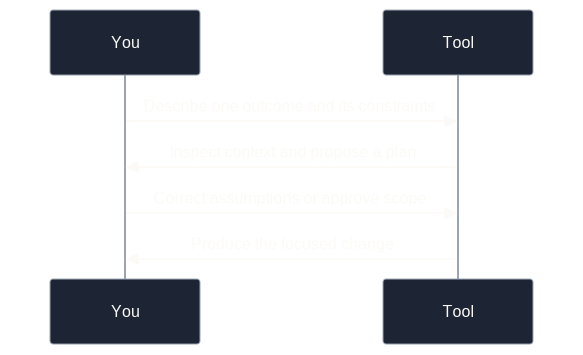
Caption: Planning creates a checkpoint between the initial request and the code change.
Alt: A sequence in which you provide the outcome, the tool proposes a plan, you correct or approve it, and the tool produces a focused change.
If you do not understand the plan, pause and ask for an explanation in plain language. AI assistance should reduce the cost of understanding code, not create a reason to skip understanding it.
Use tests and tools as the source of truth
Generated code is a proposal, not proof. Plausible syntax can still hide an incorrect assumption, miss an edge case, or conflict with behavior elsewhere in the project.
Review the patch before running it. Check whether it changes only the intended files, follows nearby patterns, handles failure paths, and preserves interfaces that other code may use. Pay special attention to deleted checks, widened permissions, altered database operations, and new network calls because their effects can extend beyond the immediate function.
Then run the project’s normal verification steps. Depending on the project, these may include focused tests, a broader test suite, type checking, static analysis, formatting checks, a build, or a manual interaction with the changed behavior. A passing check supports only what that check covers, so combine checks according to the risk of the change.
For a validation rule, you might first add or inspect tests for an accepted input, the newly rejected input, and an existing boundary case. Run those focused tests while iterating, then run the broader relevant checks before treating the work as complete.

Caption: A generated patch becomes acceptable only after review, checks, and direct verification.
Alt: A generated patch moves through diff review, focused tests, broader checks, and behavior verification, with failed evidence returning it for revision.
Ask the tool to report what it actually ran and what it did not run. “The implementation should work” is not equivalent to a successful test result. If a check cannot run because a service or dependency is unavailable, record that limit and verify what you can without pretending the missing evidence exists.
Version control provides another safety boundary. Start from a known state, inspect the diff frequently, and keep unrelated work out of the same change. A focused commit makes it easier to understand, review, and reverse the AI-assisted work.
Improve prompts by correcting one failure at a time
Your first instruction does not need to be perfect. Treat prompting as an iterative engineering activity rather than a search for magic wording.
When the result is wrong, describe the observed mismatch. “The new test expects a different error shape from the existing tests” gives the tool something concrete to correct. “Try again” provides no diagnosis and may produce a different version of the same mistake.
A practical correction contains four parts:
- What you expected.
- What happened instead.
- The evidence, such as a test failure or relevant code path.
- The boundary the revision must respect.
For example:
I expected blank names to use the existing validation error. The new test instead introduces a different response shape. Update the implementation and test to follow the neighboring validation case. Do not modify the shared response type.
This keeps the conversation anchored to observable behavior. It also helps distinguish a code defect from an unclear requirement.

Caption: Effective prompting is a correction loop driven by observed mismatches.
Alt: Expected behavior leads to a result that is checked against evidence, with mismatches adding constraints before another revision.
Over time, repeated corrections reveal which project rules should be written down. Stable instructions about testing, formatting, architecture, and prohibited changes belong in repository documentation rather than in your memory. That gives future AI-assisted tasks a more reliable starting point.
Increase autonomy only after the loop is reliable
Once you can consistently define, review, and verify small changes, you can expand the tool’s scope. Move from one function to a small feature, then from a single-file edit to a coordinated change across a few related files.
Increase only one dimension at a time. If you enlarge the task, keep the permissions narrow. If you allow broader file access, keep the task small. Changing task size, access, and deployment authority together makes failures harder to understand.
Keep high-impact actions behind explicit review. Changes involving authentication, authorization, sensitive data, destructive database operations, production infrastructure, or external publishing deserve tighter boundaries and stronger evidence. The tool can help inspect and prepare such work, but convenience does not remove the need for accountable human judgment.
Think of autonomy as a dial, not a switch. Turn it up when the previous level repeatedly produces understandable plans, focused diffs, and verifiable results. Turn it down when the tool starts guessing, touching unrelated files, or producing changes you cannot confidently explain.
Where people get stuck learning this alone
Learning AI coding alone tends to go wrong in three ways. Setup eats the first evening: editors, extensions, keys and permissions. Then the assistant produces code that runs but that you cannot explain, and without a reviewer nothing tells you whether it is sound, so mistakes pile up quietly. Finally it is hard to judge what to accept and what to rewrite, because the skill is in reviewing the output, and that is the part nobody checks when you practise alone. Keep changes small, read every diff, and have someone experienced look at your first real project.
If you want a guided order and a reviewer for your work, the Full Stack with AI outline lists every session.
Key takeaways
- Begin with one small task whose result you can recognize and test.
- State the desired behavior, what must stay unchanged, and the completion check.
- Provide relevant code and constraints, but keep secrets and sensitive data out of prompts.
- Ask for a plan before allowing a non-trivial edit.
- Treat generated code as a proposal until the diff and verification evidence support it.
- Correct observed mismatches instead of asking vaguely for another attempt.
- Increase scope and autonomy gradually, while keeping high-impact actions under explicit review.
This approach establishes a safe, repeatable way to begin AI coding. It does not settle which tools, workflows, or permission levels are right for every project; those choices depend on the codebase, its risks, and the checks available to verify each change.