
How to host a static page on S3 that calls your Lambda API, and tag it for later
Published
From the course: Hands-on Cloud for Freshers, session 8: Ship it, watch it, tear it down
You have a working notes API. A curl command lists your notes, and a POST adds one. Now you want an ordinary web page that anyone can open, and you want to be able to find every piece of it again when you tear it down. The obvious route is to upload an HTML file and point it at the function. That route fails in three ways. The browser refuses to hand the API’s answers to the page. A hostile note runs script in every visitor’s browser. Later, a search for your resources misses half of what you made. This article claims that shipping the page takes four decisions, made in order. Split the app into two halves joined by one URL. Render every note as text. Allow exactly one origin through CORS. Tag at creation time while knowing what tags will miss. Get those four right and the page works on the first try and comes down cleanly.
The page and the API are two independent halves
The finished application has two halves that never touch directly. S3, the storage service, holds one file, index.html, and serves it from a website endpoint. That is the address a bucket’s static website is served from. In the Region ap-south-1 it takes the form <bucket>.s3-website.ap-south-1.amazonaws.com with the http scheme in front.
The browser fetches that page once. From then on, the page’s script talks straight to the Lambda function URL, the HTTPS address that invokes your function. The function reads and writes the DynamoDB table hoc-notes.

The page loads once from S3, then the browser calls the function URL directly
S3 never sees a note, and the function never serves HTML. The two halves are joined in exactly two places: the function URL written into the page, and the page’s origin written into the function’s CORS setting.
Think of it as a shop window and a stockroom with one hatch between them. You can rebuild either side as long as the hatch stays where both expect it.
Confirm the API answers before you build anything
Start from the API. You need the function hoc-notes-api with its function URL, its role hoc-notes-api-role, and the hoc-notes table. If you are starting without them, rebuild the API first; nothing below works without it.
If you “parked” the function earlier to stop traffic, undo the exact parking you used. Each kind is reversed only by its own reverse:
- Parked with reserved concurrency set to
0: remove that setting withaws lambda delete-function-concurrency --function-name hoc-notes-api. Deleting the reserved concurrency configuration reactivates the URL. Changing the auth type does not. - Parked by switching the URL’s auth type to
AWS_IAM: set it back toNONE.
Then check from a terminal:
curl -s "$URL"You should see your notes as JSON. If you don’t, fix that before you go further. A page cannot succeed where curl fails.
Write the page so a note can never become code
The page is a form, a message line and a list. Its script carries two decisions worth understanding. Here is the heart of it:
<input id="text" maxlength="500" required>
<script>
  const FUNCTION_URL = "<your function URL>";
  async function loadNotes() {
    const response = await fetch(FUNCTION_URL);
    const data = await response.json();
    list.replaceChildren();
    for (const note of data.notes) {
      const item = document.createElement("li");
      item.textContent = note.text ?? note.title; // never innerHTML
      list.appendChild(item);
    }
  }
</script>
The submit handler sends a POST with a content-type: application/json header and a body of {"text": ...}. It then shows either “Saved.” or the error the API returned.
maxlength="500" is a convenience, not a defence. It stops someone typing in this page. It does nothing to a curl request, which is why the function checks the length again. Every rule that matters is enforced on the server. The browser copy only saves a round trip.
textContent, not innerHTML. Picture the loop written as item.innerHTML = note.text, and someone posting this note with curl:
<img src=x onerror="alert(document.cookie)">The API stores it correctly, because to the API it is just text. But innerHTML parses it as HTML. The broken image fails to load, and its onerror handler runs in every visitor’s browser. This is cross-site scripting: an attacker’s script running inside your page. With textContent, the browser shows those characters literally and runs nothing.
Think of user data as a quotation: textContent puts it in quotation marks.
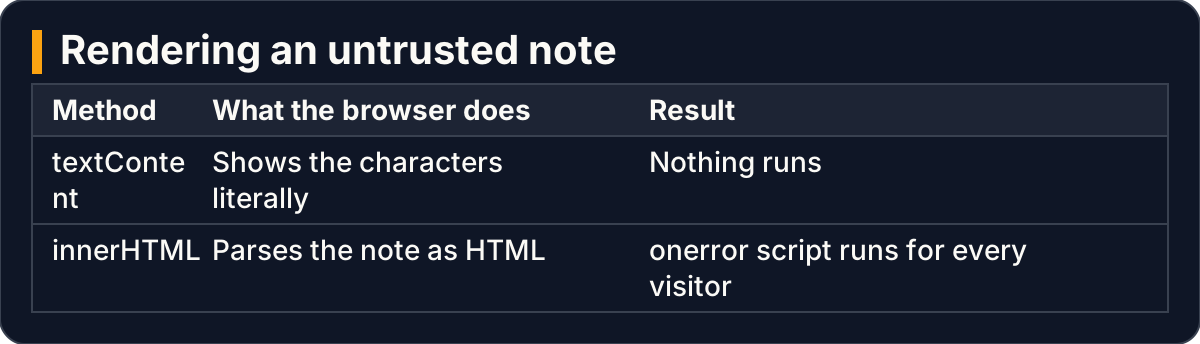
The same hostile note is harmless as text and runs as code when parsed as HTML
Publish the bucket as a website, tagged from the start
Create a new bucket named hoc-site-<your-initials>-<random-digits> in the same Region as the function. While you create it, give it the tag key project with the value hands-on-cloud. Tag searches are case sensitive, so Hands-On-Cloud would count as a different value. Pick one spelling and keep it.
Then, in the S3 console:
- Properties → Static website hosting → Edit → Enable. Set Index document to
index.htmland choose Save changes. Note the Bucket website endpoint. - Permissions → Block public access (bucket settings) → Edit. Clear Block all public access and save. This makes the bucket readable by anyone, which is the intent for a public page. If your account-level setting also blocks public access, S3 applies the more restrictive of the two. Clear that one too.
- Permissions → Bucket policy → Edit. Allow
s3:GetObjectonarn:aws:s3:::<bucket>/*for the principal*. - Put your real function URL into
FUNCTION_URLand uploadindex.html.

Four bucket steps take a private bucket to a public website serving index.html
Sometimes an organization that manages your account forbids clearing the block. In that case, keep the bucket private and open the page through a presigned URL. That is a link granting time-limited access to one object without changing the bucket policy. The page’s origin is then https, and that is the origin you must allow next.
Allow exactly one origin on the function URL
An origin is the scheme, host and port together. Your page’s origin is the website endpoint, http included. The function URL is a different origin.
CORS (cross-origin resource sharing) is a set of response headers. With them, a server tells the browser which other origins may read its responses. If the response’s access-control-allow-origin header does not name your page’s origin, the browser withholds the answer from the script. The details appear only in the console.
On the function, go to Configuration → Function URL → Edit, tick Configure cross-origin resource sharing (CORS), and set:
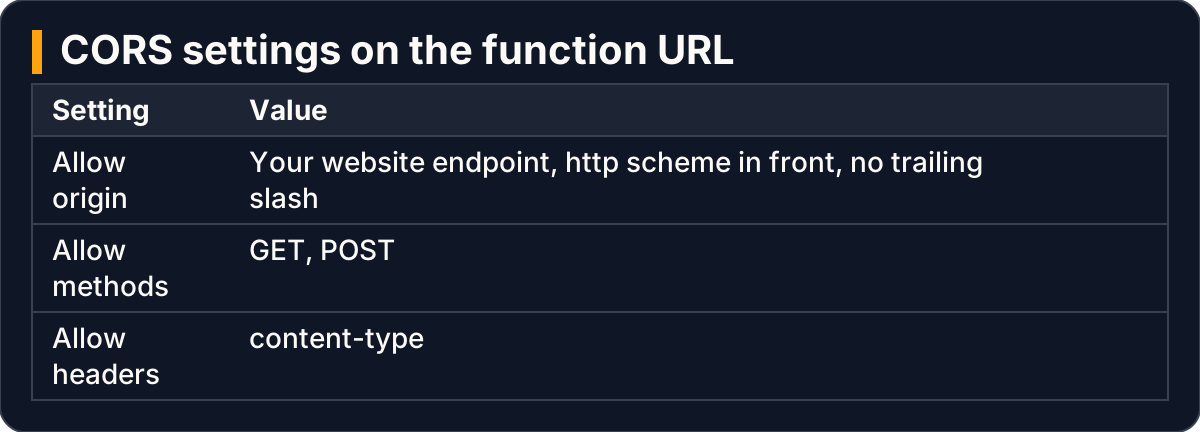
The function URL allows one origin, two methods and one header
The content-type header matters because the page sends JSON. A POST with that header triggers a preflight: an OPTIONS request the browser sends first to ask permission.
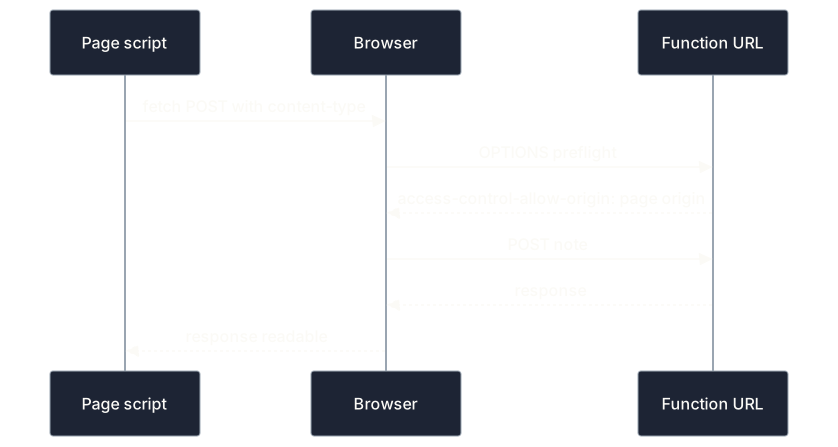
The browser asks permission with OPTIONS before each POST, then reads the allowed answer
What you should see, and how to read a failure
Open the website endpoint and add a note. You should see “Saved.” and the note in the list. In the browser’s developer tools, the Network tab shows an OPTIONS request before each POST. The responses carry an access-control-allow-origin header naming your page.
The common failure is a page that loads, then shows Could not load notes under an empty list, while curl -s "$URL" in your terminal lists every note. The function answered. Its CORS setting did not allow the page’s origin, so the browser kept the response from the script. curl is not a page’s script, so it never meets that check.
Compare the origin in the Console error with the one you allowed, character by character. The usual culprits are https typed for http, or a trailing /.
The page is served over HTTP because S3 website endpoints do not support HTTPS. The S3 documentation, retrieved 2026-10-02, points to a CDN or a managed hosting service in front of the bucket when you need HTTPS. In our view, HTTP is acceptable for a practice page showing notes you typed. It is not acceptable for anything with sign-in or personal data.
Tags find what you labelled, not what exists
Tagging the bucket is what lets you find it later. Search Tag Editor for project = hands-on-cloud in your Region across all resource types, and the bucket appears with the function, table and topic you tagged.
The search answers “what did I label?”, not “what exists?” It misses three kinds of resources:
- resources without the tag, including ones with a different-case value;
- resources in Regions you did not select;
- resource types it does not support.
Lambda creates the log group /aws/lambda/hoc-notes-api itself, untagged. IAM roles are not tied to any Region, so check hoc-notes-api-role in the IAM Roles list directly.

A tag search finds labelled resources; untagged, other-Region and IAM items need a direct check
To clean up this half, delete dependents first. Delete the objects in the bucket, then the bucket, because S3 deletes only an empty bucket. After that, the bucket name returns to a shared global pool, and another account can claim it. That is harmless for a practice bucket, but it is a reason never to delete a bucket name that real links still use.
Delete the function before its role, table and log group. While the function exists, a request can recreate the log group or fail against a missing table.
Prove each deletion with the service’s own listing. Commands such as aws lambda get-function should report not found, or the console list should no longer show the item. Then check the billing pages as a cross-check, not as proof.
Key takeaways
- The page and the API are joined only by one URL in the page and one origin in the CORS setting; get both exactly right.
- Render every note with
textContent. A note is untrusted input, andinnerHTMLturns it into code. - Browser limits like
maxlengthsave a round trip. The server enforces the rules. - Allow one origin: the website endpoint with its
httpscheme and no trailing slash. Whencurlworks but the page is blank, read the Console. - Tag at creation, in one consistent case, then check by name what tags miss: auto-created log groups, other Regions, IAM roles.
This article settles how to ship and tag the page. It does not settle serving it over HTTPS, nor how to set up and prove an alarm that tells you when the API breaks. Both need their own treatment.