
How the AWS Free account plan works, and how you hear about spending before it surprises you
Published
From the course: Hands-on Cloud for Freshers, session 1: A safe first AWS account
You open your first cloud account and launch a small server to see a web page appear. You close the laptop. The server keeps running, and nothing on your screen tells you so. In a cloud interview, a fresher is often asked some version of the question that follows: how does the free option actually work, and how would you know if money were moving? Most candidates answer “it’s free for a while.” That answer is not quite right.
This article answers those interview questions from the AWS documentation, retrieved on 2026-10-02. On the current Free account plan, “free” means a fixed budget with a fixed end, not unlimited use. Mistakes do not produce a bill. Instead, they drain your credits and shorten the life of the account. You hear about spending through two kinds of signal: alerts that come to you, and balances you check yourself. Two habits, one Region and one tag, keep the thing you forgot visible. With this model you can predict what ends your account and catch problems early. AWS changes these rules from time to time, so when a screen differs from what is described here, the current documentation wins.
“What does ‘free’ mean on a new account?” Two plans that differ at the moment credits run out
The question an interviewer asks: When you sign up, what are you choosing between?
At sign-up you choose one of two plans. Both start with the same thing: credits, a balance that AWS applies to your usage. You receive a starting amount at sign-up and can earn more by completing set activities.
The Free account plan cannot incur charges and limits which services you can use. The Paid account plan opens every service. The credits apply first on both plans. On the Paid plan, usage beyond the credits is charged at normal rates.
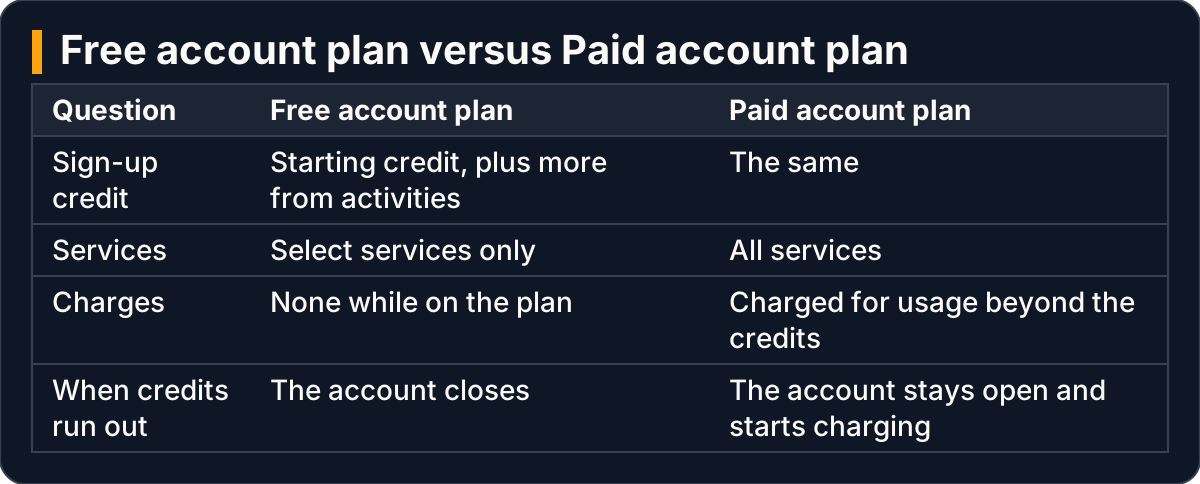
Both plans start with credits; they differ on services and on what happens when credits run out
Some services also have Always Free allowances. More than 30 services include a monthly free usage amount that applies on both plans.
A strong answer adds one warning. Many older tutorials describe a different free tier, where a set of services stayed free for a fixed period after sign-up. Accounts created under the current plans do not work that way. If a guide says a service “is free for the first year”, check the current Free Tier documentation before you rely on it.
“What ends the Free plan?” Whichever of two limits arrives first
The question: Your account is on the Free plan. When does it stop?
Think of the Free plan as a prepaid phone card. You load it once and it cannot run up a bill. It stops working when the balance reaches zero or when its validity date passes, whichever comes first. The documentation says the same thing: the plan ends after its fixed period from sign-up, or when your credits are fully used, whichever occurs first.
What happens next is the part most candidates miss. When the Free plan expires, the account closes automatically and you lose access to your resources and data. AWS keeps your content for 90 days and then permanently deletes the account. Upgrading to the Paid plan within those 90 days keeps the account.

Either limit ends the Free plan; then the account closes, and only an upgrade within 90 days keeps it
So a forgotten server does not send you a bill on this plan. It spends your card down faster. Picture a student who deploys a portfolio project and puts the link on a CV. The account runs out of credits, and the link returns an error before the interview. The Free plan turns every mistake into lost time rather than lost money. In our view, that is a good trade for a learner, but only if you can see the balance moving.
“Can anything move you off the Free plan without asking?” Yes, and organizations are the common trap
The question: Is there any way a Free plan account becomes a paying account by accident?
Yes. The documentation lists actions that upgrade a Free plan account automatically, and joining AWS Organizations is one of them. AWS Organizations is the service that groups several accounts under one management account.
This matters in a way that surprises people. AWS generally recommends IAM Identity Center (IAM stands for Identity and Access Management) for giving people sign-in access. However, enabling its recommended organization instance from a standalone account creates a new organization. In the documentation’s words, creating an organization from a free tier account “automatically upgrades your account to a paid plan with pay-as-you-go pricing. Your free tier credits expire immediately.”
A good interview answer makes the connection out loud: “On the Free plan I use an IAM user for everyday work, because the recommended alternative would create an organization and move me to the Paid plan.” Choose the IAM user when you have a single learning account on the Free plan and want to keep it there.
“How will you hear about spending?” One signal rings, the other you read
The question: How would you find out that something is using your credits?
Picture a water tank on a roof with two signals. A float rings a bell when the tank is nearly empty. A meter shows the level, but only when you go and read it. AWS gives you both kinds of signal for your credits, and you want both, because each one covers a gap in the other.
Signals that come to you. First, AWS sends automatic Free Tier usage alerts: it emails the root user’s address when your use of a service passes 85 percent of its Free Tier limit. For an individual account these alerts are on by default. You can change the address they go to under Billing preferences → Alert preferences. Second, AWS sends periodic emails about your credit balance and the approaching end of the plan.
A budget you create. AWS Budgets is a cost-management tool that emails you when cost or usage crosses, or is forecast to cross, a threshold you set. Its simplified template workflow offers two templates that matter here:
- A zero spend budget, which notifies you after your spending exceeds Free Tier limits.
- A monthly cost budget, which notifies you if you exceed, or are forecast to exceed, an amount you set.
Places you check yourself. The AWS Management Console home page and the Billing and Cost Management console both show the Free plan’s credit balance, the days remaining and the expiry date.

Usage alerts and budgets come to your inbox; the balance, days left and expiry date wait to be read
One habit from people who run real systems is worth repeating in an interview: an alarm is only as good as the inbox it reaches. Send alerts to the email address you actually read.
“Why set a budget on a plan that cannot charge you?” Because credits start draining at that moment
The question: If the Free plan can’t bill you, isn’t a zero spend budget pointless?
This is the follow-up that separates a memorised answer from an understood one. According to the Free Tier documentation, when you go beyond a service’s free monthly allowance, your Free Tier credits automatically apply to cover the eligible cost.
That moment is exactly when your credits start to drain. A zero spend budget is the alarm for that moment. It does not protect you from a bill. It protects you from a closed account.
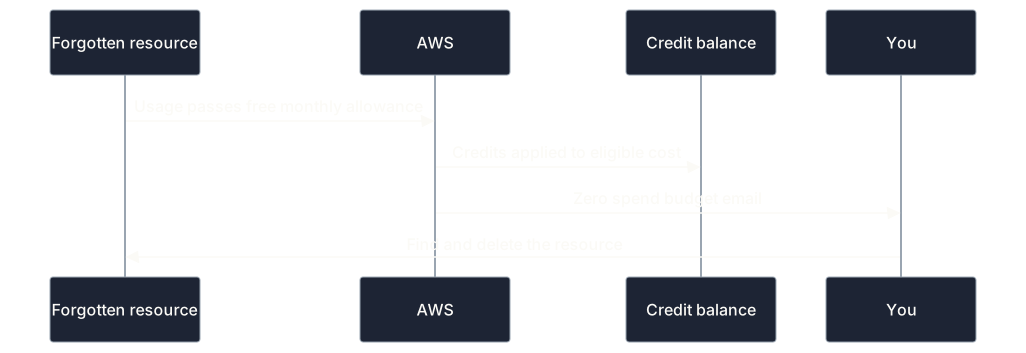
Passing a free allowance is the point where credits begin to pay, and the zero spend budget reports it
“Why work in one Region and tag everything?” So a forgotten resource stays findable
The question: You got a budget email but can’t see anything running. What happened?
The likely answer is the wrong Region. A Region is a geographic area containing AWS data centres, such as ap-south-1, Asia Pacific (Mumbai). Most resources live in exactly one Region, and the console shows one Region at a time through a selector in the navigation bar. AWS warns that if you create something and then cannot see it, the console might be displaying a different Region.
Think of it as parking a scooter in one of two identical car parks and then searching the other one. The scooter is not missing, but it looks gone, and the meter keeps running. A server created in Mumbai does not appear while the selector says Singapore, yet it still runs and still uses credits.
The first habit is therefore one Region, used for everything. You can pick one near you; AWS suggests choosing a Region close to your users that offers the services you need. Whichever you pick, stay in it. IAM is the exception: users, groups and policies have no Region and are global to the account.
The second habit is one tag. A tag is a key–value label attached to a resource, for example project = hands-on-cloud. A tag works like a name sticker on a lunch box in a shared fridge: when it is time to clear the fridge, you take out every box with your name and nothing else. Not everything accepts tags (IAM user groups, for example, do not), so keep a list of untaggable items by name.

One Region keeps resources on screen; one tag lets you find each one when it is time to delete
Together, the two habits turn “I think I deleted everything” into a check you can actually run.
What to practise before the interview
The underlying question is usually “You’ve just opened an account to learn on. Before launching anything, what do you set up, and why?” For the spending side, practise saying three beats aloud, in order:
- Plan. “I’m on the Free account plan. It can’t charge me, but it ends when the credits run out or its fixed period passes, whichever comes first, and then the account closes. Anything I forget shortens its life.”
- Alarm. “Usage alerts arrive by default at 85 percent of a free limit. I add a zero spend budget so I hear the moment credits start being applied, and I know where the console shows my balance and the plan’s end date.”
- Scope. “I use one Region and tag everything, so after every project I can prove nothing is left running.”
Speak the answer rather than rereading it. Saying it aloud exposes the gaps that reading past a written answer hides. Most candidates drop the third beat because nothing has been built yet, but it is the beat that makes every later cleanup possible.
Key takeaways
- The Free account plan is a prepaid card with two expiry conditions: credits used up, or the fixed period passed. Whichever comes first ends it.
- When the plan ends, the account closes. You can recover it only by upgrading to the Paid plan within 90 days.
- Joining AWS Organizations, including through IAM Identity Center’s organization instance, upgrades a Free plan account and expires its credits immediately.
- Usage alerts at 85 percent come by default. A zero spend budget reports the moment credits start being applied. The console shows your balance, days remaining and expiry date.
- One Region and one tag keep forgotten resources visible and findable.
This article settles how the current Free account plan ends and how you hear about spending on it. It does not cover the root user and IAM user setup in depth, how permission policies decide access, or the newer sign-up path that some customers are offered, which works differently.