
How a subnet becomes public or private, and how /16 and /24 ranges fit inside a VPC
Published
From the course: Hands-on Cloud for Freshers, session 5: Your own network: VPC basics
You built a network yourself, launched a server into it, and gave it a firewall rule allowing web traffic from anywhere. The server shows as running. Its health checks pass. The browser spins and gives up, and nothing anywhere reports an error. An interviewer who hands a fresher this scenario is really asking two things: what makes a subnet public or private, and how address ranges like /16 and /24 fit together.
This article answers both, in the order interview questions usually arrive. The claim is short. A subnet is public only because its route table sends internet traffic to an internet gateway, and a public subnet still needs a public address on each instance before anyone outside can reach it. The address ranges are nested: the /16 is the whole network and each /24 is a non-overlapping slice of it. Once you hold that picture, a silent timeout becomes a checklist instead of a mystery.
A running server in your own VPC can still be unreachable
Interview question: “Your instance is running and the security group allows port 80. Why does the page time out?”
First, a few terms. A VPC (virtual private cloud) is a virtual network for your account, isolated from other networks, whose address range you choose. A subnet is a range of addresses inside it where you launch servers. A security group is a firewall attached to a server.
The answer starts with what a ready-made network gives you and a network you build yourself does not. Cloud accounts come with a default VPC that already has a connection to the internet, a route to that connection, and a public address on every server. A VPC you create has none of these until you add them.
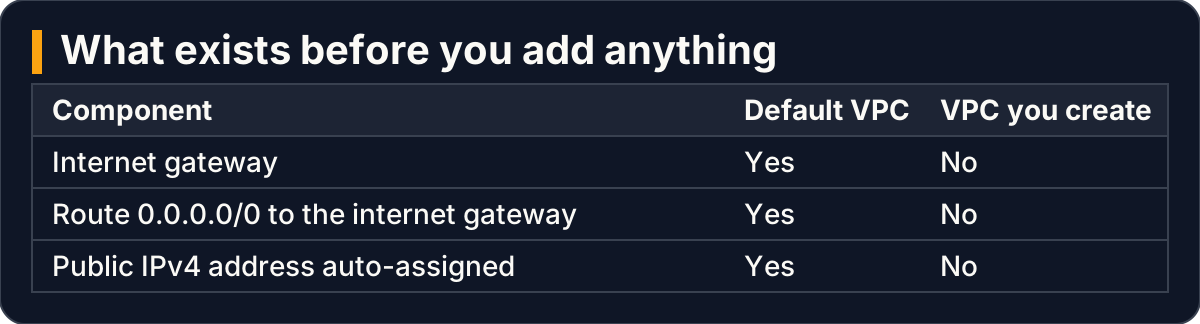
A VPC you build starts without the three pieces the default VPC gives you
So in the scenario, three conditions were missing, and the security group was the only part that was right. That is the shape of most network faults. The part you checked is fine, and the part you did not know existed is absent. A strong answer names all three missing pieces, not only the firewall.
Two pictures of a VPC give the same diagnosis order
Interview question: “Explain a VPC to someone who has never seen one.”
Two pictures help, and good candidates offer both.
Think of it as a gated housing colony. The VPC is the colony, with internal house numbers that mean nothing outside its walls. Each subnet is a lane. The internet gateway — the part that connects the VPC to the internet — is the main gate onto the public road. A route table, the set of rules deciding where traffic leaving a subnet goes, is the signboard at the end of each lane. One line says “anything inside the colony: stay on internal roads”. Another says “anything else: go to the main gate”.
A public IPv4 address is a postal address the outside world can write on an envelope. Without it, no letter can be addressed to the house at all, however open the gate. The two guards fit too. A network ACL (access control list) checks everyone entering and leaving the lane against a numbered list and has no memory. The security group is the guard at the house door, who remembers visitors and lets them back out.

Each part of a VPC maps to a part of a gated colony
The second picture is a checklist one request must pass on its way from your laptop to the server:
- The browser sends it to a public IPv4 address.
- The internet gateway, attached to the VPC, translates that to the server’s private address.
- The network ACL allows it inbound on port 80.
- The security group allows it inbound on port 80.
- A web server is listening on port 80, and nothing on the machine blocks it.
- The reply leaves through the network ACL outbound.
- The reply follows the route table, where
0.0.0.0/0must point at the internet gateway.
Either picture gives you the same order to check: address, route, subnet guard, door guard, then the server itself. In the colony picture, the last check is simply whether anyone is home.
/16 is the whole network and /24 is one slice of it
Interview question: “Your VPC is 10.0.0.0/16 and your subnet is 10.0.1.0/24. What do those numbers mean?”
A CIDR block writes an address range as a starting address and a count of fixed leading bits. The smaller the number after the slash, the larger the range. An IPv4 address has 32 bits, so /16 fixes the first 16 bits (10.0) and leaves 16 free. That covers 65,536 addresses, from 10.0.0.0 to 10.0.255.255.
A subnet takes a slice. 10.0.1.0/24 fixes 24 bits and leaves 8 free, covering the 256 addresses from 10.0.1.0 to 10.0.1.255. Think of it as a street of 256 lanes, each lane holding 256 houses: the /16 is the street, and a /24 is one lane.

Each /24 subnet is a slice of the /16 VPC, and slices never overlap
Three rules govern the slices, and interviewers like to probe each one:
- A subnet’s block must be between a
/28and a/16in size. - Subnets in one VPC may not overlap.
- The provider keeps five addresses in every subnet: the first four and the last.
In 10.0.1.0/24, the reserved five are listed in the card below. That leaves 251 usable addresses, not 256. The follow-up question is often “why was my script refused when it assigned 10.0.1.1?” The answer is that the address belongs to the router.
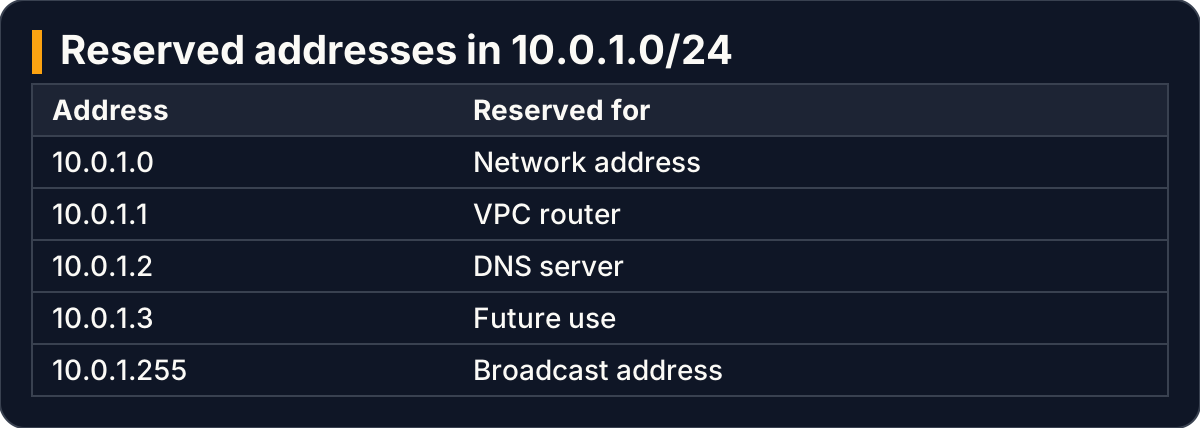
Five addresses in every subnet are reserved, so a /24 has 251 usable addresses
Only the route table makes a subnet public
Interview question: “What makes a subnet public?”
This is the question most often answered wrongly, so answer it exactly. A subnet is public if its route table has a route to an internet gateway. A subnet without such a route is private. It is not the subnet’s name. It is not a security group open to the whole internet. It is not whether servers inside it have public addresses. A subnet named public is still private if its route table lacks that route.
Every route table starts with the local route. It covers the VPC’s own range, lets resources inside the VPC reach each other, and cannot be removed. To make a subnet public, you add a second route. Its destination is 0.0.0.0/0, meaning every IPv4 address not already covered. Its target is the internet gateway.

The same subnet is private or public depending only on whether a 0.0.0.0/0 route reaches the gateway
There is a trap worth naming. A new subnet uses the main route table, the one that comes with the VPC, unless you explicitly associate it with another. The usual practice is to leave the main route table private and create a custom route table for the public subnet. Then any subnet added later is private until you decide otherwise. In our view, saying this unprompted is what separates a memorised definition from an understood one.
The reason it matters in practice is easy to picture. Someone places a database in a subnet whose route table sends 0.0.0.0/0 to an internet gateway, and opens its port “temporarily”. Spotting this in a review requires knowing that the route table, not the name, decides.
A public address is a separate decision from a public subnet
Interview question: “The route is in place. Why is the server still unreachable?”
A route to the internet gateway is necessary but not enough. The server also needs a public IPv4 address, which the internet gateway maps to the server’s private address. Servers launched into a subnet you created get no public IPv4 address by default.
You can change that in two places:
- On the subnet, by enabling auto-assign public IPv4 address. This applies to every server launched there afterwards.
- At launch, by setting auto-assign public IP to enable in the network settings. This overrides the subnet setting for that one server.

Reachability needs both a public subnet and a public address on the instance
The follow-up catches many candidates: “You enable auto-assign on the subnet. Does the server already running there get an address?” No. The setting reaches forward only, to servers launched afterwards. The running server keeps the addressing it was launched with.
There is also a cost reason to treat this as a deliberate choice. Every public IPv4 address is charged while it exists, whether the server is busy or idle. Choose auto-assign for the one subnet that needs it, not everywhere.
A related detail fits here. If the interviewer asks how to allow browser-based console connections without opening SSH to everyone, the answer is the managed prefix list for the connection service, com.amazonaws.<region>.ec2-instance-connect. An inbound rule on TCP port 22 from that list replaces a rule allowing 0.0.0.0/0. Even then, the server still needs a public address and a route to the internet.
What to practise before you are asked
Reading these answers is not the same as being able to give them. Practise each one aloud, because speaking exposes the gaps that reading past a written answer hides:
- Define a public subnet in one sentence, without mentioning names or security groups.
- Work out two ranges by hand. Say how many addresses a
/16and a/24cover, and why a/24gives 251 usable ones. - Name the five reserved addresses in
10.0.1.0/24and what each is for. - Walk the timeout checklist in order: address, route, network ACL, security group, server.
- Explain the auto-assign follow-up, including why a running server does not gain an address.
If you have a practice account, build one VPC by hand, break one condition at a time, and note what each failure looked like. Then delete everything you created.
Key takeaways
- A subnet is public only because its route table sends
0.0.0.0/0to an internet gateway; without that route it is private, whatever it is called. - A
/16VPC range holds 65,536 addresses; each/24subnet is a non-overlapping slice of 256, of which 251 are usable. - A public subnet is not enough: each server also needs a public IPv4 address, and subnet auto-assign applies only to servers launched afterwards.
- Leave the main route table private and give public subnets a custom route table, so new subnets start private.
- When a page times out silently, check in order: address, route, subnet guard, door guard, server.
This article settles what makes a subnet public and how the ranges nest. It does not cover private subnets that need outbound internet access, which is a separate design with its own costs, nor how to write network ACL rules for stateless reply traffic in full.