
Loading Database Credentials into Spring Boot Without Packaging Them
Published
A deployment is ready, but the database password is still sitting in application.yml, destined to be copied into the JAR. For a Spring Boot 3 application, the better default is to store database credentials in AWS Secrets Manager and import them at startup with Spring Cloud AWS. Parameter Store can hold encrypted values, but AWS recommends Secrets Manager for passwords and other credentials because it is purpose-built for secrets and supports automatic rotation. [2][3][4]
Database passwords belong in Secrets Manager
Parameter Store is primarily a centralized configuration store for named values such as environment names, endpoint URLs, resource identifiers, tuning parameters, and other static configuration. [3] It supports plain String values, comma-separated StringList values, and encrypted SecureString values. [3]
Secrets Manager is designed specifically to manage, retrieve, and rotate database credentials, application credentials, tokens, API keys, and other secrets throughout their lifecycles. [2] AWS explicitly recommends Secrets Manager rather than Parameter Store for database credentials, API keys, and tokens. [3]

Database credentials fit Secrets Manager; ordinary configuration fits Parameter Store.
The distinction is about lifecycle as much as encryption. Parameter Store can encrypt a SecureString with AWS Key Management Service, but it does not provide credential rotation. [3] Secrets Manager encrypts secrets at rest and supports automatic rotation, including native database integrations. [3] During rotation, both the stored secret and the credential in the database or service are updated. [4]
A sensible decision rule is:
- Choose Secrets Manager for a database username and password, API key, token, private key, or another value whose disclosure grants access.
- Choose Parameter Store for configuration such as an endpoint, resource identifier, environment setting, or tuning value.
- Treat an encrypted Parameter Store value as encrypted configuration, not automatically as the best home for a credential.
There can be operational reasons to keep an existing password in Parameter Store, but encryption alone does not erase the lifecycle difference. For a new database integration, Secrets Manager is the clearer fit because the service and its rotation model are designed around credentials. [2][3]
Config import keeps the secret outside the JAR
Spring Cloud AWS integrates both services with Spring Boot’s config import mechanism. [1] At startup, the appropriate starter retrieves the external value and adds it to Spring’s environment, where it can be used through property placeholders, @Value, or @ConfigurationProperties. [1]
That means the JAR needs to contain only the location of the secret, not the secret value. A practical split is:
spring.config.import=aws-secretsmanager:/myapp/prod/database
spring.datasource.username=${db.username}
spring.datasource.password=${db.password}
The import statement identifies an external secret, while the datasource properties reference keys that will be added to the Spring environment. [1] The password itself remains in Secrets Manager and is retrieved when the application starts. [1][2]
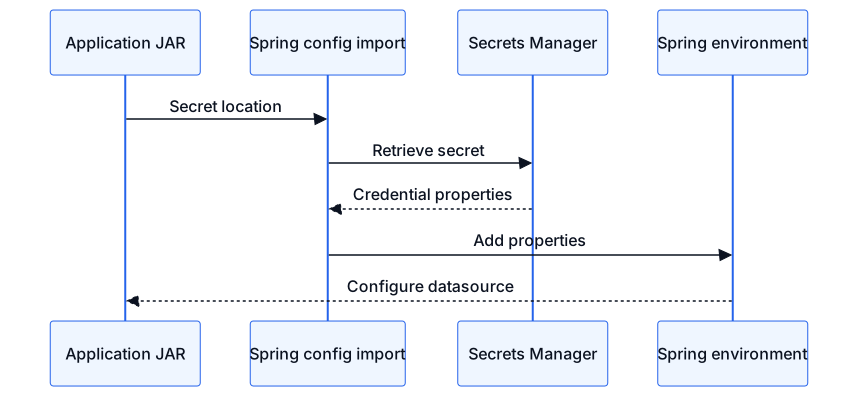
The JAR carries a secret location, while startup retrieves the credential into Spring configuration.
This is different from generating an application.properties file containing the password during the build. Secrets Manager replaces a hard-coded credential with a runtime service call, avoiding storage of the credential in application source code or packaged application components. [2]
The import line is not itself sensitive in the same way as the password. It names what the application must retrieve, while IAM controls whether the running application may retrieve it. Secrets Manager access through Spring Cloud AWS requires secretsmanager:GetSecretValue. [1]
For a required database credential, leaving off optional: is a sensible default. If the named secret does not exist, Spring Cloud AWS then fails application startup instead of continuing without the expected value. [1] Adding optional: allows startup to continue when the secret is missing, which is useful only when the application can genuinely operate without it. [1]
A JSON secret maps cleanly to datasource properties
Secrets Manager can store a JSON SecretString. [1] When Spring Cloud AWS imports such a secret, every top-level JSON key becomes a property in the Spring environment. [1]
For example, the secret named /myapp/prod/database could contain:
{
  "username": "app_user",
  "password": "stored-outside-the-jar"
}
Without a prefix, those keys would appear simply as username and password. [1] Those names are broad and could collide with properties imported from another source.
Spring Cloud AWS therefore supports adding a prefix to every property resolved from a secret. [1] The prefix is appended exactly as written, so it must include a trailing dot when a dot-separated property name is wanted. [1]
spring.config.import=aws-secretsmanager:/myapp/prod/database?prefix=db.
spring.datasource.username=${db.username}
spring.datasource.password=${db.password}
This creates db.username and db.password in the Spring environment. [1]

A prefix turns broad JSON keys into distinct database configuration properties.
In practice, prefixing is the safer layout when an application imports more than one property source. It makes the origin and purpose of each key visible and avoids relying on generic names.
Another valid arrangement is to use datasource property names directly as the JSON keys. That can reduce placeholder wiring, but it ties the stored secret’s schema to a particular application configuration shape. As a matter of judgment, neutral keys plus an import prefix are easier to reuse and reason about.
Secrets Manager also supports plain-text and binary secrets. [1] For a plain-text secret, Spring Cloud AWS exposes the value under the secret’s name; the documentation demonstrates this by storing a JDBC URL and referencing it through the final name segment. [1] A JSON secret is usually the clearer choice when the username and password belong together because its top-level keys become independently addressable Spring properties. [1]
The starter, credentials, and region complete the startup path
The project needs the Spring Cloud AWS Secrets Manager starter, whose Maven coordinates are io.awspring.cloud:spring-cloud-aws-starter-secrets-manager. [1] Spring Cloud AWS provides a bill of materials that manages compatible dependency versions, so individual starter versions do not need to be specified when the bill of materials is imported. [1]
A minimal Maven arrangement is:
<dependencyManagement>
  <dependencies>
    <dependency>
      <groupId>io.awspring.cloud</groupId>
      <artifactId>spring-cloud-aws-dependencies</artifactId>
      <version>${spring-cloud-aws.version}</version>
      <type>pom</type>
      <scope>import</scope>
    </dependency>
  </dependencies>
</dependencyManagement>

<dependencies>
  <dependency>
    <groupId>io.awspring.cloud</groupId>
    <artifactId>spring-cloud-aws-starter-secrets-manager</artifactId>
  </dependency>
</dependencies>
The starter automatically configures the Secrets Manager integration and a SecretsManagerClient. [1] Spring Cloud AWS clients use an AWS credentials provider and region provider to determine how to authenticate and where to send requests. [1]
By default, the credentials provider checks several sources, including system properties, environment variables, web identity credentials, shared credential files, container credentials, and instance profile credentials. [1] The default region chain checks the aws.region system property, the AWS_REGION environment variable, shared AWS files, and EC2 metadata. [1]

Runtime identity and region let the config importer retrieve only the named secret.
The clean deployment model is to give the workload an AWS identity and grant that identity permission to retrieve only the required secret. Spring Cloud AWS requires secretsmanager:GetSecretValue for loading the value. [1] A sensible least-privilege policy limits that action to the specific secret ARN rather than granting access to every secret.
The AWS access key and secret access key should not be moved into application.yml as a substitute for the database password. That would merely replace one packaged credential with another. In an AWS runtime, using the workload’s supported runtime credential source keeps long-lived AWS credentials out of the JAR while allowing the default provider chain to authenticate. [1]
If automatic region discovery does not fit the deployment, spring.cloud.aws.secretsmanager.region can configure the region used by the Secrets Manager client. [1] A custom SecretsManagerClient can also be registered during bootstrap, but that is an advanced option rather than a requirement for ordinary config import. [1]
Parameter Store uses the same pattern for non-secret configuration
If the value is ordinary application configuration, the corresponding starter is io.awspring.cloud:spring-cloud-aws-starter-parameter-store. [1] A Parameter Store path can be imported into the Spring environment with aws-parameterstore:. [1]
For example:
spring.config.import=aws-parameterstore:/myapp/prod/?prefix=app.Spring Cloud AWS retrieves parameters beneath the path and exposes their final names as properties. [1] A prefix can be added to keep them grouped and prevent collisions. [1] The application role needs ssm:GetParametersByPath for this integration. [1]

Separate stores feed one Spring environment while retaining different responsibilities.
The two imports can coexist. For example, database credentials can come from Secrets Manager while endpoints and resource identifiers come from Parameter Store. Secrets Manager supports importing multiple secrets, and Parameter Store supports importing multiple paths. [1]
Parameter Store also supports interpreting stored text as properties, JSON, or YAML through its import extension option. [1] That can be useful for grouped configuration, but it does not change the service-selection rule: AWS still recommends Secrets Manager for credentials and other secrets. [3]
Rotation requires a reload decision
Moving the password out of the JAR separates credential changes from application builds and deployments. [2] Secrets Manager can rotate credentials automatically, and rotation updates both the stored secret and the database or service. [4]
A running application, however, must obtain the changed property before it can use the new credential. Spring Cloud AWS provides a Secrets Manager property-source reload feature, but it is disabled by default. [1] When enabled, its refresh strategy reloads configuration beans annotated with @ConfigurationProperties or @RefreshScope, while restart_context recreates the application context and its beans. [1]
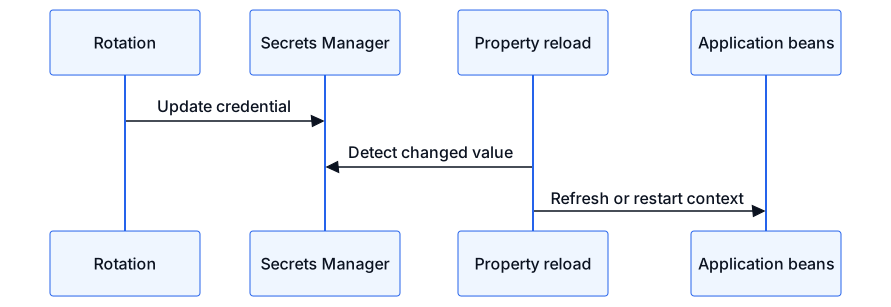
Rotation changes the stored credential; reload determines when application beans receive it.
A sensible operational choice depends on how the datasource and connection pool react to refreshed properties. refresh updates only eligible configuration beans, whereas restart_context recreates the whole application context. [1] Rotation should therefore be tested as a complete path: update the database credential, update the stored secret, load the new property, and establish new database connections.
Key takeaways
- Use Secrets Manager for the database username and password; use Parameter Store for ordinary static configuration. [2][3]
- Add the Secrets Manager starter and import the secret with
spring.config.import=aws-secretsmanager:.... [1] - Store related credentials as top-level JSON keys and add a property prefix when generic names could collide. [1]
- Keep only the secret identifier and property placeholders in the packaged configuration; retrieve the credential at startup. [1][2]
- Give the runtime identity
secretsmanager:GetSecretValuefor the required secret, and let the standard credential and region providers supply connection context. [1] - If credentials rotate while the application is running, choose and test an appropriate property reload strategy. [1][4]
This settles where the password belongs and how Spring Cloud AWS can load it without packaging the value. It does not settle the application-specific behavior of a particular datasource or connection pool during rotation; that behavior must be verified with the components and reload strategy used by the application.
Sources
- https://docs.awspring.io/spring-cloud-aws/docs/4.2.0/reference/html/index.html (retrieved 2026-10-01)
- https://docs.aws.amazon.com/secretsmanager/latest/userguide/intro.html (retrieved 2026-10-01)
- https://docs.aws.amazon.com/systems-manager/latest/userguide/systems-manager-parameter-store.html (retrieved 2026-10-01)
- https://docs.aws.amazon.com/secretsmanager/latest/userguide/rotating-secrets.html (retrieved 2026-10-01)